
Samooha

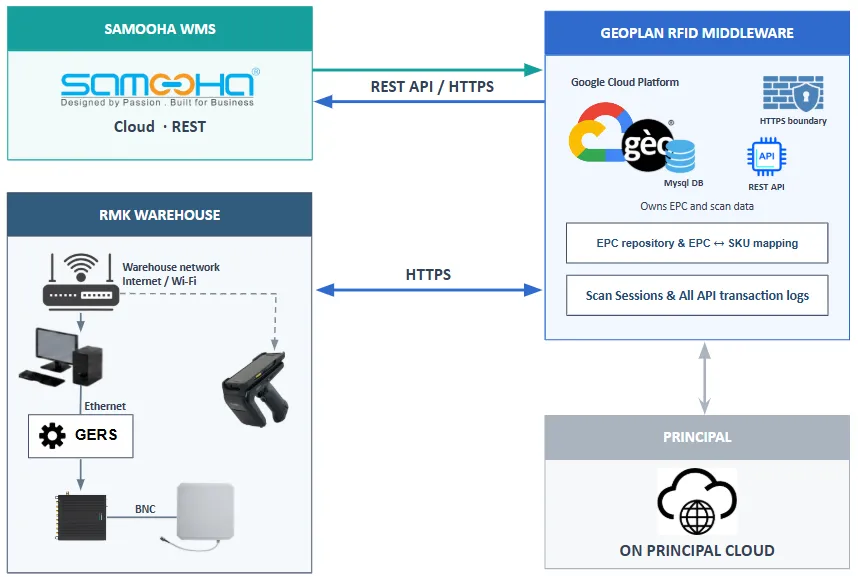
Samooha POSTs GRN, CRN, GD, and VRN documents to Geoplan in batches. A warehouse user on the Geoplan app picks a document and starts the scan. Geoplan POSTs scan results back only for GRN. Geoplan manages scan sessions, EPC data, and EPC-to-SKU mapping. Samooha remains the source of transaction documents and owns inventory updates.
The diagram shows the Samooha, warehouse, Geoplan middleware, and ON Principal connections:
| Flow | Data exchange | Source document reference |
|---|---|---|
| Goods Receipt | Samooha POSTs the document in a batch. After scan, Geoplan POSTs scanned quantity per SKU. | Purchase Invoice |
| Goods Delivery | Samooha POSTs the document in a batch. No scan-result return leg. | Sales Order |
| Customer Returns | Samooha POSTs the document in a batch. No scan-result return leg. | Credit Note |
| Vendor Returns | Samooha POSTs the document in a batch. No scan-result return leg. | Debit Note |
Goods Delivery, Customer Returns, and Vendor Returns have no scan-result return leg. Every request still receives an HTTP acknowledgement.
RFID scope excludes put-away, picking, packing, stock transfer, and cycle count.
Process flow
Section titled “Process flow”| Step | Actor | Action |
|---|---|---|
| 1 | Samooha | POST GRN, CRN, GD, and VRN documents in batches. |
| 2 | Warehouse user | Pick a document on the Geoplan app and start the scan. |
| 3 | Geoplan | POST scan results to Samooha only for GRN. |
Integration rules
Section titled “Integration rules”- Samooha initiates document ingest. Geoplan does not expose webhooks. Geoplan POSTs Goods Receipt results to Samooha’s documented endpoint.
- Transaction calls use
POSTfor audit integrity. - Samooha filters transaction lines to RFID-enabled ON products.
- Product identity in transaction lines is the SKU. Barcode, VPM code, and product details come from synced master data.
- Geoplan POSTs SKU and scanned quantity to Samooha for Goods Receipt. EPC values stay in Geoplan.
- One API key covers the Samooha integration within an environment.
Integration order
Section titled “Integration order”| Page | Use |
|---|---|
| Authentication | Send the integration API key |
| Master Data | Load product data before transaction calls |
| Scan Activities | Use the four fixed activity IDs |
| Transaction Documents | GR, CR, GD, and VR ingest, and the GRN result post |
| Errors & Retries | HTTP status reference |