Skip to content

Master Data

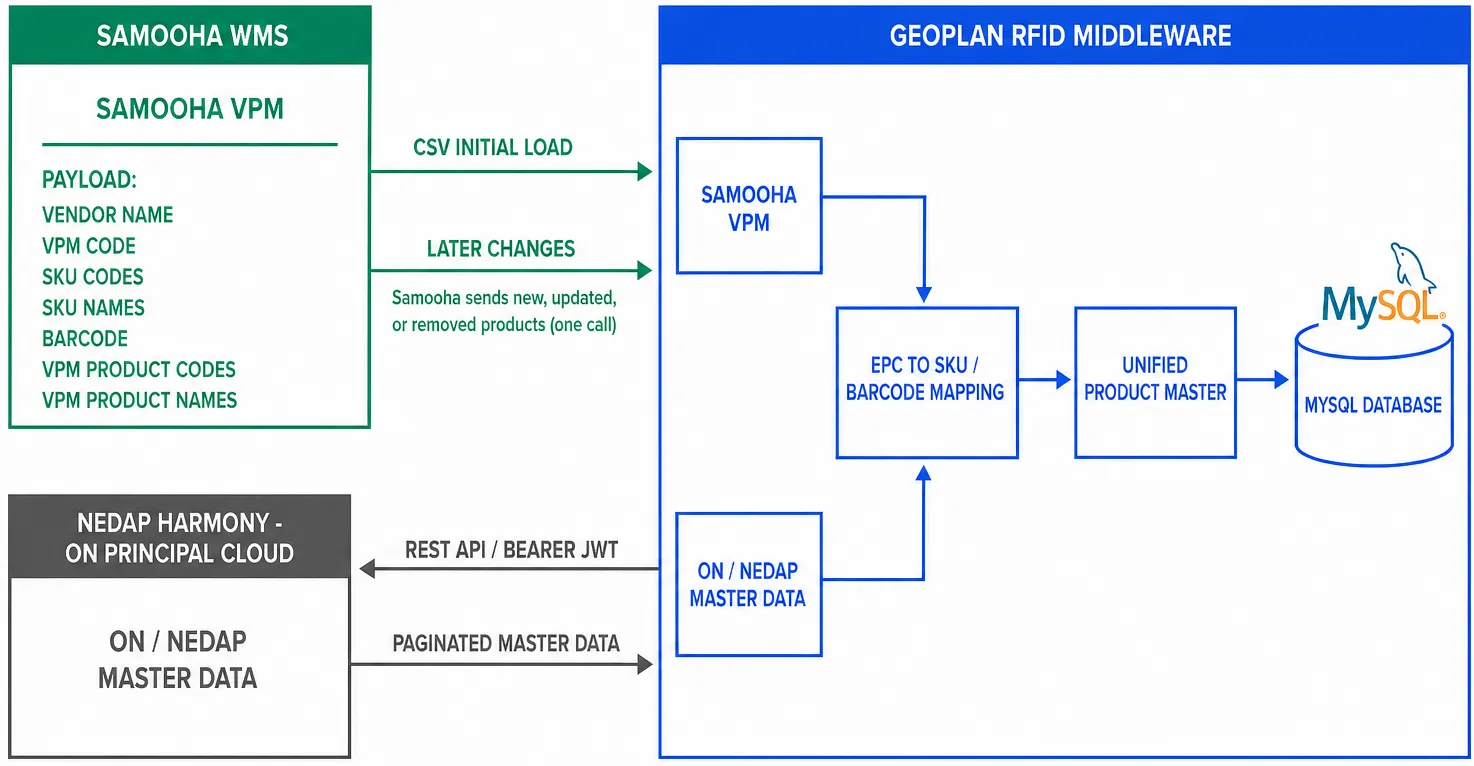
Samooha exposes its existing product master and vendor product mapping. Geoplan retrieves ON master data directly from Nedap Harmony, not through Samooha. Geoplan combines both sources for RFID matching.

Master data sync architecture showing Samooha product data and a direct Geoplan pull from Nedap Harmony

Source Data Responsibility
Samooha SKU, Barcode populated with EAN, article data, VPM Expose current product data
ON/Nedap Harmony master-data records and EPC-to-master lookup Expose the Harmony API for Geoplan to pull and adapt
Geoplan EPC-to-product mapping and unified product master Adapt both source formats and retain RFID data

Inventory balances and inventory rules stay in Samooha.

See ON Principal Master Data Sync for the Harmony endpoint, authentication, pagination, and EPC lookup contract.

Stage Data Transfer Owner and cadence
Initial load Full Samooha product master and data definitions CSV file by email Samooha, once before transaction integration
Delta sync Additions, updates, and deletions API Samooha, nightly

The initial CSV file and its data definitions are delivered to the SSI project email address. Later changes use the API, not another full CSV load.

Identifier Rule
EPC ON uses SGTIN-96 in 24 hexadecimal characters. Many EPCs can map to one product.
ON product key GTIN-12 or UPC-A
Samooha Barcode EAN for ON products
Cross-source match A zero-prefixed EAN-13 and its 12-digit UPC-A form represent the same GTIN. Remove only that single prefix zero for the comparison key.
Transaction key SKU or item code

Keep the original UPC or EAN value with the source record. Use the normalized comparison key only when joining the two sources.

The current Geoplan backend runs a configured source pull:

POST https://api-stg-sling.rgoc.com.ph/api/v1/master-data-sync/run
x-api-key: <api-key>

The nightly sequence is:

  1. Samooha calls the Geoplan POST endpoint. The request has no body.
  2. Geoplan sends GET requests to the configured Samooha product endpoint.
  3. Geoplan maps source fields, upserts current records, and applies deletion records.
  4. Geoplan stores the successful source checkpoint for the next run.

With no query parameters, Geoplan uses the last successful checkpoint for the active source. The first run is a full baseline. Later runs are deltas when the source has a change-time filter configured.

Use the status endpoint to inspect the active source and recent runs:

GET https://api-stg-sling.rgoc.com.ph/api/v1/master-data-sync/status
x-api-key: <api-key>

Geoplan stores the Samooha source URL. The fields below match the integration payload received from Samooha.

Requirement Rule
Response JSON array at the configured path, data by default
Identity One stable, non-empty SKU or item-code field per record
Create or update Return the current record. Geoplan upserts by the configured identity field.
Delete Return the identity plus the configured deletion flag set to true.
Checkpoint Accept the configured changed-since query parameter and return a source timestamp when available.
Pagination Filter changes before pagination. Use the configured page or offset parameters.

This payload documents the integration exchange. It does not prescribe Samooha’s internal database schema.

{
"data": [
{
"sku": "ON-ARTICLE-001",
"barcode": "0123456789012",
"name": "Example ON article",
"vpmCode": "ON-VPM-001",
"updatedAt": "2026-08-24T00:00:00.000Z",
"isDeleted": false
},
{
"sku": "ON-ARTICLE-002",
"updatedAt": "2026-08-24T00:05:00.000Z",
"isDeleted": true
}
],
"meta": {
"syncTimestamp": "2026-08-24T00:10:00.000Z"
}
}

Only ON-brand records are in scope.

Kept in Samooha Kept in Geoplan
Inventory balances Adapted product master
Inventory posting and variance rules EPC-to-SKU or barcode mapping
Source product records Unified RFID product records

Transaction lines identify products by SKU. Geoplan resolves barcode, VPM code, and product details from this synced master.